Application Shell
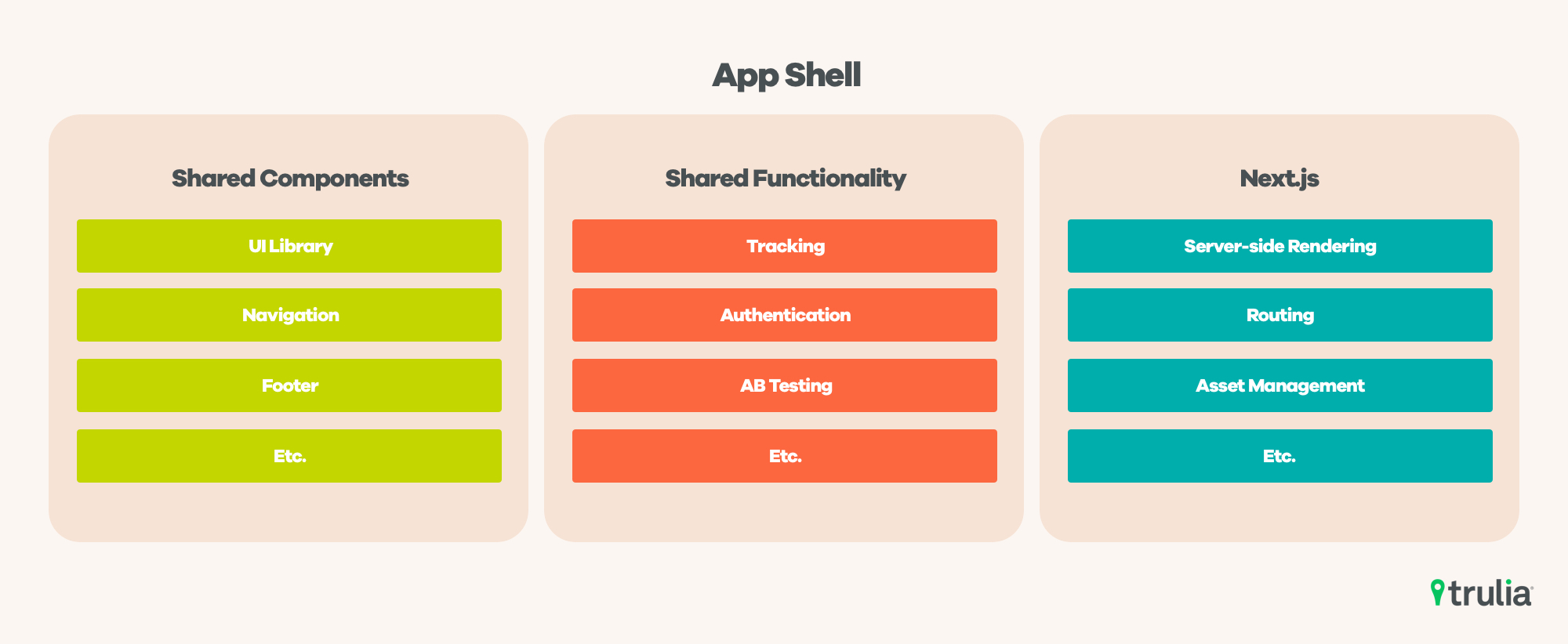
An application shell is a minimal HTML, CSS, and JavaScript skeleton that delivers instant, app-like shell interfaces while content loads in the background.
The Core Idea Behind an Application Shell
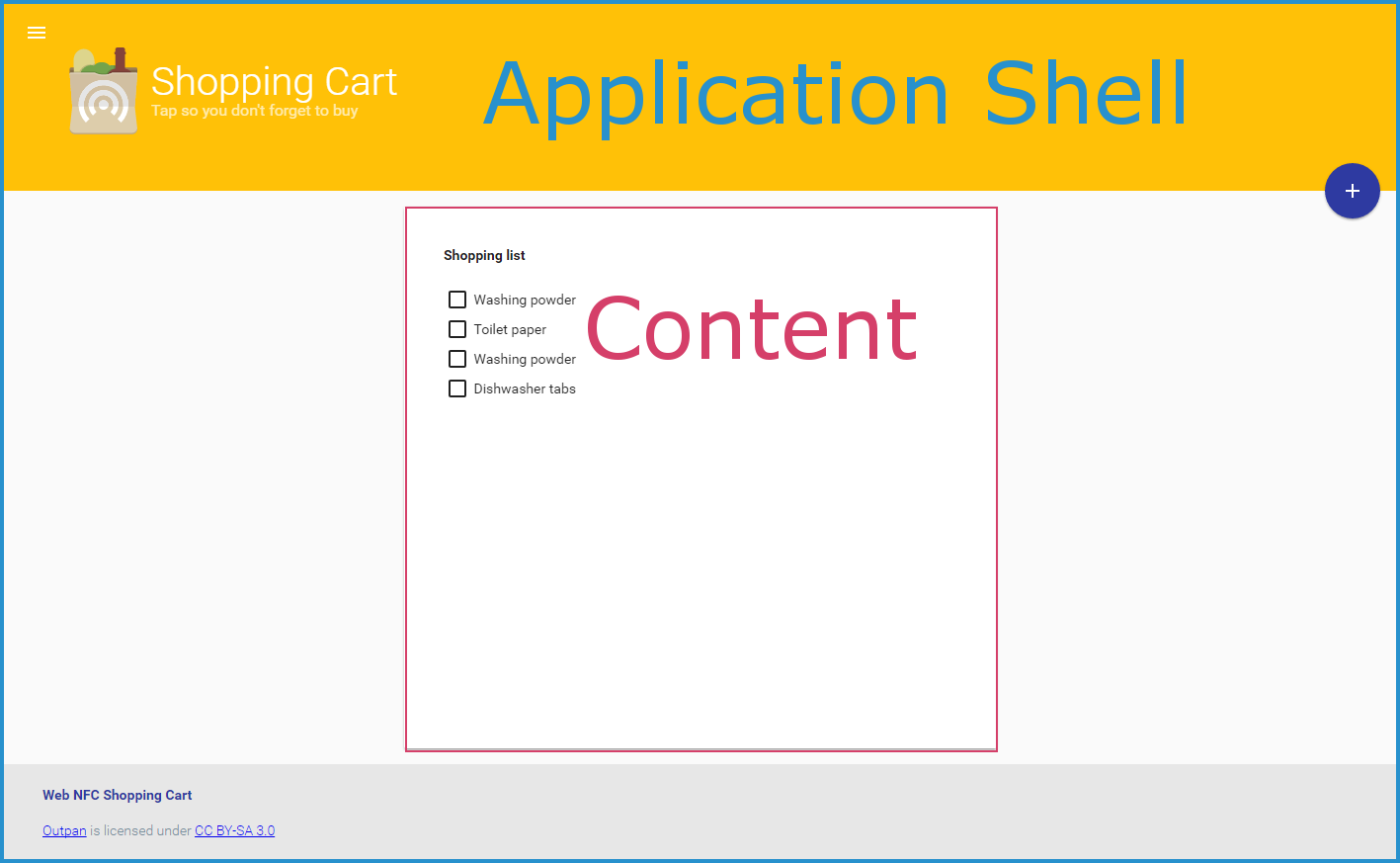
The application shell model focuses on separating the static interface chrome from the dynamic data that changes over time. By caching the shell itself, a progressive web app can render a consistent layout almost instantly, even on slow networks or offline conditions. The shell typically contains your navigation, branding, and UI placeholders, so users perceive your app as fast and responsive from the very first visit. This approach borrows from traditional desktop and mobile applications, where the shell, toolbar, and menus remain stable while the document or view changes.
Instead of loading entire pages, the application shell loads only the content fragments that need updating, which reduces data usage and server load. Service workers play a crucial role here by intercepting network requests and serving cached shell assets when appropriate. The result is an experience that feels more like a native app and less like a series of full page reloads, smoothing out perceived latency and keeping the interface snappy.
Key Architectural Components
At a high level, an application shell consists of a small set of core assets that you want to cache aggressively. These usually include an HTML file that defines the layout, critical CSS for above-the-fold rendering, and essential JavaScript that handles routing, caching strategies, and updates. You can think of these files as the skeleton of your app, while data fetched from APIs fills in the details such as lists, articles, or user-specific information.
- Static HTML shell that provides the overall structure and navigation
- Critical CSS for fast first meaningful paint
- Lightweight JavaScript for routing and service worker control
- Cache strategies that keep the shell reliable and up to date
By keeping these assets small and versioned, you make it easy to update the shell when your design or feature set evolves. The data layer, often handled by frameworks or custom API clients, remains separate so you can refresh content without redeploying the entire application shell.
Performance and User Experience Benefits
One of the strongest arguments for an application shell is performance, particularly on mobile devices and variable network conditions. Because the shell is cached, users see a near-instant interface while content streams in, which dramatically lowers perceived loading time. This approach also reduces the amount of data transferred over the wire, since you are not retranslating the same layout markup on every navigation.

From a user experience standpoint, an application shell helps avoid layout shifts and flashing white screens that often occur when a browser parses large HTML documents. With a stable shell in place, you can progressively reveal content, show loading indicators, and keep the interface responsive. Over time, you can enhance the shell with features like offline fallbacks, background sync, and push notifications, making your web app feel increasingly like a first-class installable application.
Implementing an Application Shell Strategy
Implementing an application shell usually starts with identifying the minimal set of files required to render your app’s core navigation and layout. You then configure your build tools to generate these files separately from your dynamic content, often using hashed filenames for long-term caching. A service worker script can precache the shell and manage runtime caching rules, ensuring that updates are fetched when you release a new version.
- Define the routes and entry points that share the same shell
- Precache core assets during the service worker installation phase
- Use a network-first or stale-while-revalidate strategy for data, and cache-first for the shell
- Monitor cache size and versioning to avoid stale content issues
Modern frameworks and build tools often provide templates or plugins to streamline this process, but you can also implement a lightweight shell manually with vanilla JavaScript and the Cache API. The key is to strike a balance between automation and control, so your shell remains fast without sacrificing flexibility.

When an Application Shell Makes Sense
An application shell is especially valuable for content rich applications that rely on dynamic data but still want a consistent, app-like shell interface. Examples include dashboards, progressive web apps, enterprise tools, and media-heavy experiences where navigation stays stable but content updates frequently. If your users frequently revisit your app and expect quick interactions, a shell can dramatically improve retention and satisfaction.
However, not every site needs an application shell. Simple brochure sites or pages with mostly static content might gain little from this pattern and could add unnecessary complexity. Evaluate your user flows, network conditions, and update cadence before committing to a shell-based architecture, and consider starting with critical pages before expanding to the entire application.
Best Practices and Common Pitfalls
To get the most out of an application shell, keep your shell payload as small as possible and avoid embedding large data blobs directly in the initial HTML. Use lazy loading for noncritical features, split your JavaScript bundles intelligently, and rely on service worker strategies to keep cached content fresh. Version your shell assets carefully so that updates propagate reliably without breaking existing users who may have old caches stored.

- Keep the shell under tight size budgets to ensure fast downloads
- Test offline and slow network scenarios regularly
- Use meaningful cache keys and cleanup policies
- Monitor real user metrics to catch regressions early
Watch out for common pitfalls such as overcaching dynamic content, neglecting cache invalidation, or letting the shell grow into a bloated monolith. By treating your application shell as a first-class product artifact and revisiting it periodically, you maintain both performance and developer sanity as your project scales.
Conclusion
An application shell is a powerful architectural pattern that bridges the gap between traditional web pages and native app experiences. By caching a lean interface and loading content on demand, you can deliver fast, reliable, and engaging user journeys across a wide range of devices and network conditions. When implemented thoughtfully, the application shell becomes a foundation for scalable performance, easier updates, and a more consistent interface, making it a valuable tool in any modern web developer’s toolkit.
O que é um App Shell
Confira todos os cursos da Udacity em https://www.udacity.com/courses
